
As cyber threats become more sophisticated, human error remains one of the largest security vulnerabilities for small and medium-sized businesses. According to industry security reports, over 80% of corporate data breaches involve stolen credentials, phishing scams, or employee oversights.
Developing a clear, structured cybersecurity policy ensures that all staff members understand their roles in protecting sensitive company data, customer records, and network infrastructure.
In this guide, we break down the step-by-step process of creating an effective small business cybersecurity policy from scratch.
What Is a Small Business Cybersecurity Policy?

A cybersecurity policy is a formal document outlining rules, best practices, and procedures for employees interacting with technology. It establishes clear boundaries regarding acceptable computer use, password security protocols, remote work requirements, and incident reporting procedures.
Having an active policy in place helps small businesses:
- Reduce Risk of Data Leaches: Prevents accidental data exposure caused by weak passwords or unsafe web browsing.
- Maintain Regulatory Compliance: Meets basic data privacy standards required by insurance providers and corporate clients.
- Establish Operational Accountability: Clarifies administrative permissions and internal device usage boundaries.
5 Core Elements of an Effective Cybersecurity Policy
1. Acceptable Use Policy (AUP)
The Acceptable Use section details how company-owned hardware, mobile devices, and internet networks should be used during work hours.
- Workstations: Devices must be locked when left unattended, even inside the main office.
- Software Downloads: Employees should not install unapproved third-party applications without explicit authorization from the IT administrator.
- Web Browsing: Restrict access to untrusted websites, unauthorized peer-to-peer sharing networks, and unverified software distribution portals.
2. Password & Multi-Factor Authentication Standards
Weak credentials account for a massive percentage of successful cyberattacks. Your policy should enforce baseline authentication standards:
- Password Complexity: Require passwords with a minimum length of 12 to 16 characters, incorporating numbers, symbols, and mixed-case letters.
- Mandatory MFA: Enforce Multi-Factor Authentication (MFA) across all primary business software, including corporate email accounts and cloud storage.
- Centralized Password Managers: Prohibit writing passwords on physical notes or saving them in unencrypted text documents.
3. Remote Work & BYOD Guidelines
With flexible work setups becoming standard, protecting devices outside the physical office perimeter is vital.
- Encrypted Connections: Remote staff must connect via a corporate Virtual Private Network (VPN) when using public or personal Wi-Fi networks.
- Device Storage: Work-related files must remain stored within authorized cloud repositories rather than local personal hard drives.
- Automatic Updates: All endpoints must keep operating systems, web browsers, and protective software updated automatically.
Cybersecurity Policy Core Requirements
| Policy Section | Mandatory Requirement | Responsible Party |
| Authentication | Multi-Factor Authentication (MFA) Enabled | All Employees |
| Device Security | Automatic System Updates & Screen Locks | All Employees |
| Access Control | Principle of Least Privilege (PoLP) | IT Administrator |
| Incident Escalation | Report Suspicious Activity Within 1 Hour | All Employees |
4. Data Protection & Handling Protocols
Categorize company data based on sensitivity levels (Public, Internal, Confidential) and specify handling rules for each type.
- Encryption: Encrypt sensitive customer records, financial documents, and employee data both at rest and during transmission.
- Data Disposal: Properly shred physical documents containing sensitive information and securely wipe obsolete digital hardware before recycling.
5. Incident Response & Reporting Plan
An effective policy details exactly what employees should do when they suspect a breach or fall victim to a phishing email.
- Immediate Escalation: Define a primary point of contact (e.g., IT lead or security team) for reporting suspicious emails or lost hardware.
- No-Blame Culture: Encourage rapid reporting without fear of immediate penalty, as fast reaction times minimize potential breach damage.
How to Roll Out Your New Security Policy
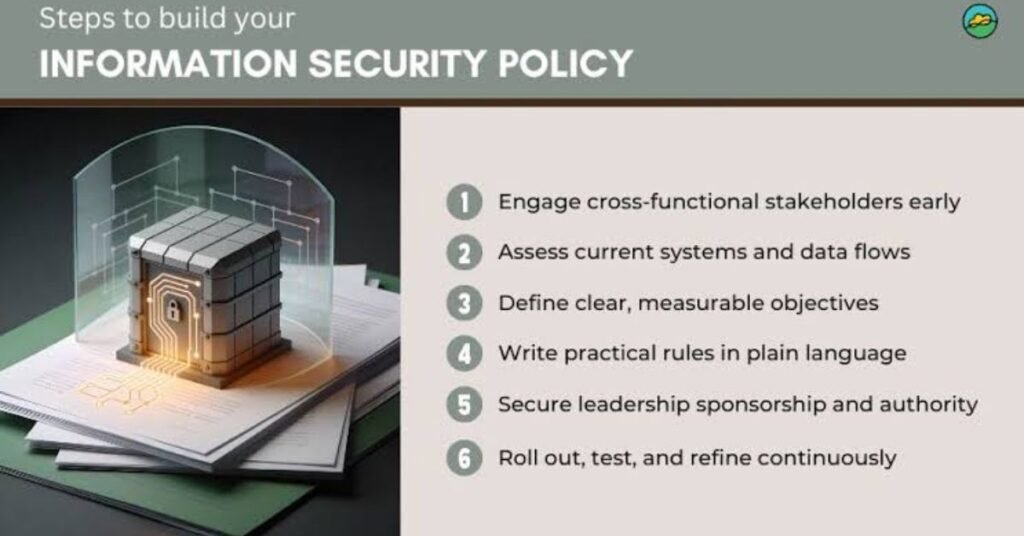
- Keep It Concise: Avoid overly complex technical jargon. Write in clear, actionable prose that every employee can digest easily.
- Conduct Mandatory Training: Walk your team through the policy during onboarding and host annual refresher sessions.
- Require Signed Acknowledgments: Have every staff member review and digitally sign the document to confirm understanding and compliance.
Conclusion
Creating a comprehensive cybersecurity policy is one of the most cost-effective strategies for safeguarding your small business. By setting clear standards for password management, acceptable device usage, and incident reporting, you build a resilient security culture that protects your digital assets against evolving threats.
Yeh rahe aap ke blog ke aakhir mein shamil karne ke liye 5 High-Search-Volume SEO FAQs:
Frequently Asked Questions (FAQs)
Q1: Why is a cybersecurity policy necessary for a small business? A cybersecurity policy establishes clear guidelines for data handling, password management, and device usage. It reduces the risk of human error—which accounts for the majority of data breaches—and ensures compliance with basic data protection standards.
Q2: How often should a small business update its cybersecurity policy? You should review and update your cybersecurity policy at least once a year, or whenever your business adopts new technologies, switches to hybrid/remote work models, or encounters new industry compliance requirements.
Q3: What is the most important section of a small business security policy? While all sections matter, Authentication & Password Protocols (including mandatory Multi-Factor Authentication) and the Incident Response Plan are the most critical, as stolen credentials and delayed breach responses cause the highest financial damage.
Q4: Should employees sign the cybersecurity policy? Yes. Requiring employees to digitally or physically sign an acknowledgment form during onboarding and annual reviews ensures accountability and confirms they have read, understood, and agreed to adhere to the guidelines.
Q5: Can a small business create a cybersecurity policy without hiring an IT consultant? Absolutely. Small business owners can start with a streamlined policy covering basic areas—such as acceptable device use, password rules, remote work security, and phishing reporting—and expand it as the team and technical infrastructure grow.